Springboard: Guide for Administrators
On-boarding New Staff / Learners through Self-Registration
All Springboard users (learners) will Self-Register using a Key Name that is specific to your organization.
As an Administrator, you control who is able to register and access your Springboard account through the distribution of your organization-specific Self-Registration Key Name.
Locating your Self-Registration Key Name
The Registration Key Name for your organization has been / will be emailed to all designated Springboard Administrators in your organization when your Springboard subscription is activated.
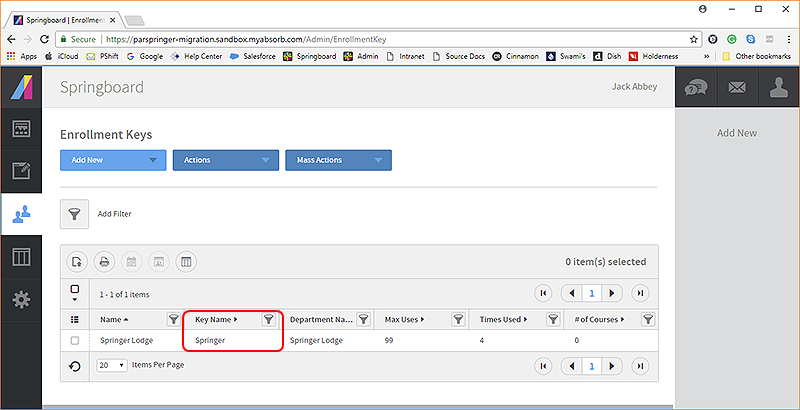
You can look up your organization 's Self Registration Key Name (called Enrollment Key Name in the system) through the Springboard Administration site.
 Here's how...
- From the Admin Dashboard, select the Users button
 from the left sidebar menu.
- Select Enrollment Keys from the left sidebar menu
- Select to enable the checkbox to the left of the Self-Registration Key Name you wish to send (to a new user)
As always, should you need assistance, email us at: springboard@springermiller.com.
top of page 
|
Getting the Self Registration Key Name and instructions to your new staff members
As an Administrator, you would simply communicate your organization’s Registration Key Name (inserted it into the instructions below) to any individual, or group of individuals, in your organization that will need to access training in Springboard.
A simple way to do this would be to copy the Self-Registration instructions below, insert your organizations Key Name after the colon in step #3. and paste it into an email to your new staff member(s). Optionally - you might include in your email the names or types of courses that the staff member(s) should enroll in and a time frame in which you expect them to be completed.
Example Self-Registration Instructions (provide this to your staff...)
To Self-Register for eLearning using Springboard:
- Using a web browser and navigate to: http://springboard.springermiller.com
- Select the Self-Register button.
- Enter the Registration Key Name:
[Insert your Self-Registration Key Name Here] - Select Self-Register to submit your request.
- Provide the required personal information on the Self-Registration form and click Self-Register once more to complete the process.
- Select My Courses or All Courses to access Springboard eLearning materials.
- That's it - you're in. You will receive a confirmation email with your new username and a link to Springboard. You will not need to Self-Register again.
| top of page
|
See related:
Springboard Administration: Admin Overview


